 Bytesweep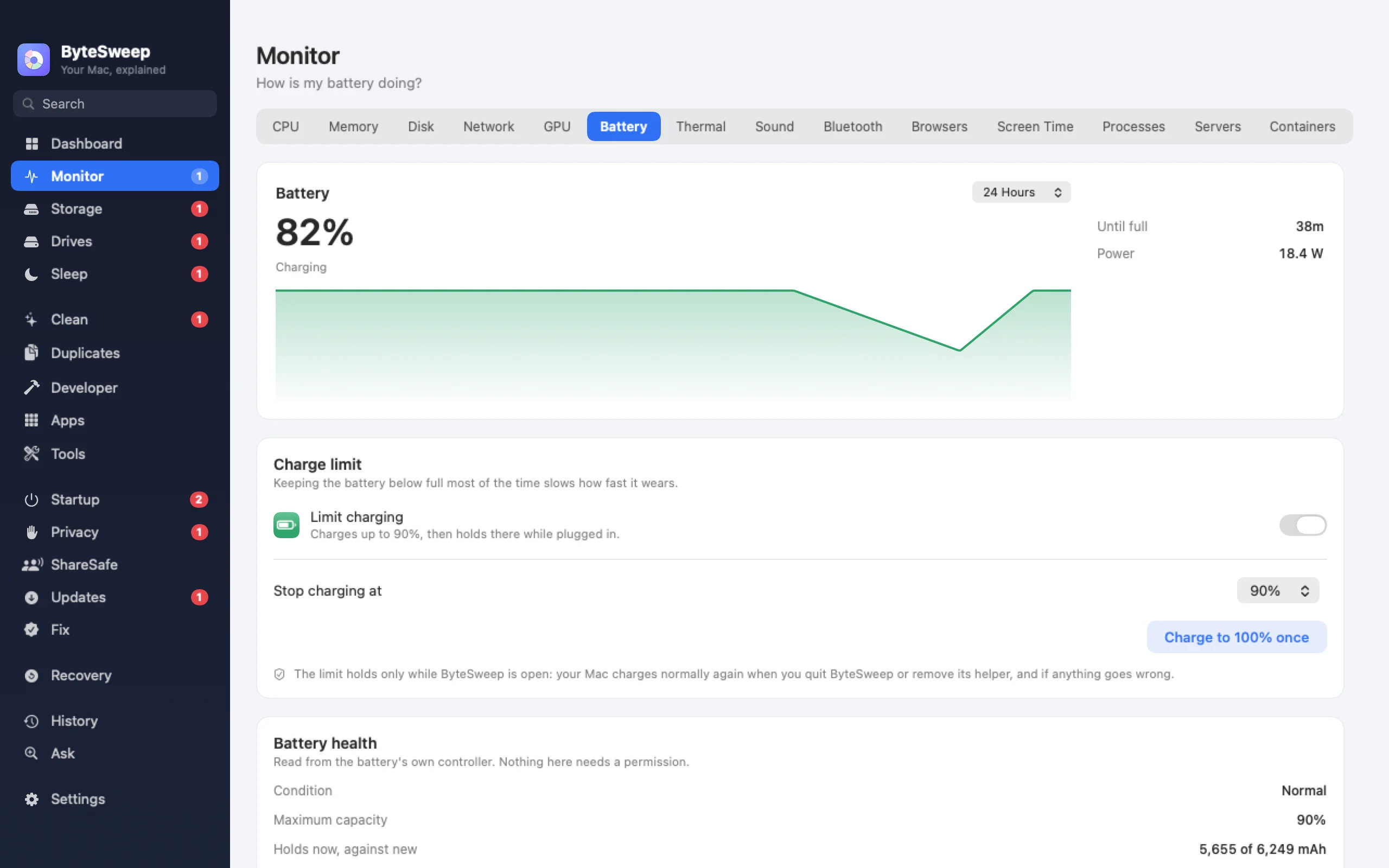
A charge limit for Apple silicon MacBooks (new in 2.1)
Choose a limit from 50 to 95% in steps of 5; 80% is a good everyday setting. When the battery reaches it, Bytesweep pauses charging and the adapter keeps powering the Mac directly. Need a full battery for a trip? "Charge to 100% once" tops it up and then goes back to your limit.
On newer firmware the Mac itself holds the limit, even while asleep. The limit holds while Bytesweep is running: quit it, or remove its helper, and charging goes back to normal. It is hidden on Intel Macs, and Macs that do not support it say so.
Battery health in plain words
Bytesweep shows the condition macOS reports, the cycle count, the full-charge capacity against what it was designed for, and the wattage of the adapter you have plugged in. On Windows it gives a verdict of Normal, Worn or Service recommended, from the battery's capacity compared with when it was new.
On Windows, the right tool for your laptop
Windows does not let apps limit charging, so Bytesweep does not try. It tells you where your laptop maker puts the setting instead: Lenovo Vantage, MyASUS, Dell Power Manager, HP's BIOS battery option or the Surface UEFI.
On Mac and on Windows
| Mac | Windows | |
|---|---|---|
| Charge limit | Apple silicon MacBooks, 50 to 95% | No; points you to your maker's tool |
| Charge to 100% once | Yes | No |
| Condition and cycle count | Yes | Yes |
| Capacity against design | Yes | Yes |
| Adapter wattage | Yes | No |
Bytesweep vs AlDente and coconutBattery
| Bytesweep | AlDente Pro | coconutBattery | |
|---|---|---|---|
| Price | $29.99 once, with every other tool | €23.99 lifetime or yearly | Free; paid Plus |
| Charge limit | Apple silicon | Yes | No |
| Battery health and cycles | Yes | Yes | Yes |
| Heat protection, sailing mode, calibration | No | Yes | No |
| Windows laptops | Health only | No | No |
Prices as each maker lists them on 1 October 2026. AlDente Pro has many more charging controls; Bytesweep covers the limit most people want.
Questions
Does macOS not already do this?
Optimised Battery Charging learns your routine and sometimes holds at 80%, but you cannot choose when or at what level. A fixed limit is predictable.
Does the limit keep working if I quit Bytesweep?
No. Charging returns to normal when Bytesweep quits or its helper is removed, so the limit is never left behind by accident.
Does it work on Intel MacBooks?
Battery health does. The charge limit is for Apple silicon MacBooks only and is hidden on Intel.