 Bytesweep
 | Platform | Location |
|---|---|
| macOS | ~/.lmstudio/models, older versions ~/.cache/lm-studio/models |
| Linux | ~/.lmstudio/models |
| Windows | C:\Users\<you>\.lmstudio\models |
The app shows the current path under My Models, and you can change it there. That’s the supported way to move the store. On a Mac that has been upgraded through several versions, check both paths: the old one isn’t cleaned up automatically, and it’s common to find tens of gigabytes in a directory the app no longer reads.
du -sh ~/.lmstudio/models ~/.cache/lm-studio 2>/dev/nullReading the tree
The layout is publisher/repository/file, and most of what you need to decide about a file is in its name. The parameter count gives the scale; the suffix gives the quantisation. Q4_K_M is a four-bit mixed quantisation, Q8_0 is eight-bit, and F16 is unquantised half precision. The same model at F16 is a bit over three times the size of its Q4_K_M, and what quantisation actually costs you covers choosing between them.
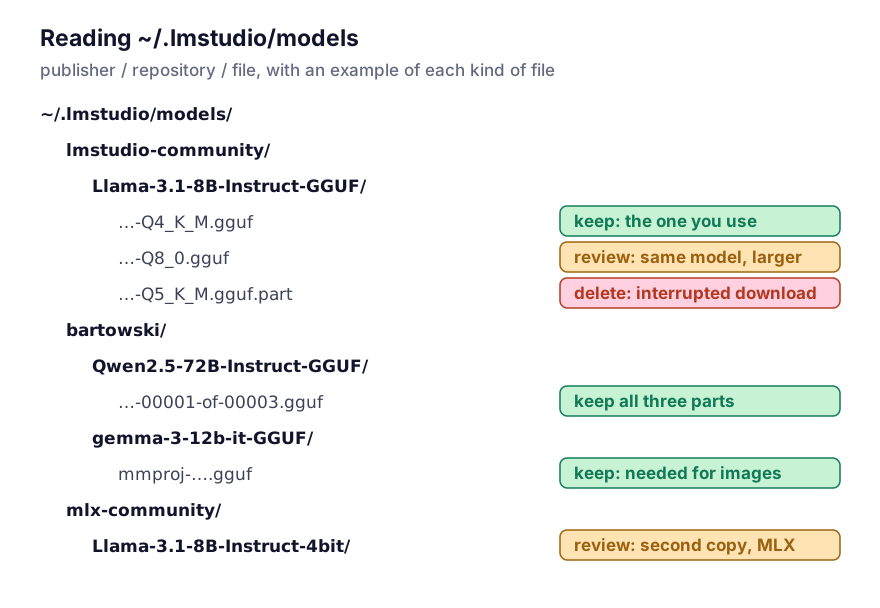
A few kinds of file sit beside the weights, and they need different treatment.
Split models are named ...-00001-of-00003.gguf. They’re one model, not three, and every part is needed. Delete one and the rest are useless, so remove the whole repository folder or nothing.
Vision models come with a projector file, usually named mmproj-...gguf. It’s small next to the weights, but the model can’t read images without it.
Interrupted downloads leave files behind, with a suffix such as .part or .incomplete. Those are pure waste and you can delete them without a second thought:
find ~/.lmstudio/models -name '*.part' -o -name '*.incomplete' | xargs -r du -shMLX models, if you use the MLX runtime on Apple silicon, are folders of .safetensors files plus config and tokeniser JSON. An MLX folder next to a GGUF of the same model is a second full copy in a different format, and it’s the commonest accidental duplicate in this folder.
To see what’s taking the space, largest last:
find ~/.lmstudio/models -name '*.gguf' -exec du -h {} + | sort -h | tail -20LM Studio reads the directory each time it looks for models; there’s no index to keep in sync. Deleting a folder in the Finder is as good as deleting it in the app.
Can other tools use these files?
Sometimes. It depends on the format each tool reads.
llama.cpp reads GGUF, so you can point it straight at a file in LM Studio’s tree and skip the second copy.
Ollama keeps its own content-addressed blob store. It can import a GGUF through a Modelfile, but the import copies the file, so you end up with two. Where Ollama keeps its own store explains the layout.
Hugging Face transformers wants the safetensors repository, not a GGUF. That’s why machines doing both local inference and Python work end up with the same model twice, once here and once in the Hugging Face cache.
When disk is tight, I’d pick one runtime per model family rather than trying to make every tool read one copy. Clear partial downloads first, then any quantisation you’ve superseded: if you have Q8_0 and Q4_K_M of an 8B model and only use the smaller one, the larger is about 8.5 GB doing nothing. Deciding which local models to delete covers the harder calls.
An external drive works for this folder. Over Thunderbolt or USB 3.2 the only cost is a slower load, since the weights are read once and then live in memory.