 Bytesweep
 Safe: package downloads
The npm, Yarn, pip, CocoaPods, Homebrew, Cargo, Maven and Go caches hold copies of packages that their registries still have. Deleting them costs a download the next time you install, and nothing else.
Xcode, Docker, package managers and local AI models each keep their own store on your Mac, and none of them cleans up after itself. Here is where each one lives, what is safe to delete, what is not, and how Bytesweep clears it with an undo.
Free to download and scan. Cleaning needs a licence: one payment per computer.
Last updated 6 October 2026
Sizes differ from one Mac to the next, so start with your own numbers. This command prints the size of each of the usual locations that exists on your Mac, smallest first:
du -sh ~/Library/Developer/Xcode/DerivedData ~/Library/Developer/CoreSimulator \
  ~/Library/Containers/com.docker.docker ~/.npm ~/Library/Caches/Homebrew \
  ~/Library/Caches/pip ~/.gradle ~/.cargo ~/.m2 ~/go/pkg/mod ~/.ollama 2>/dev/null | sort -h
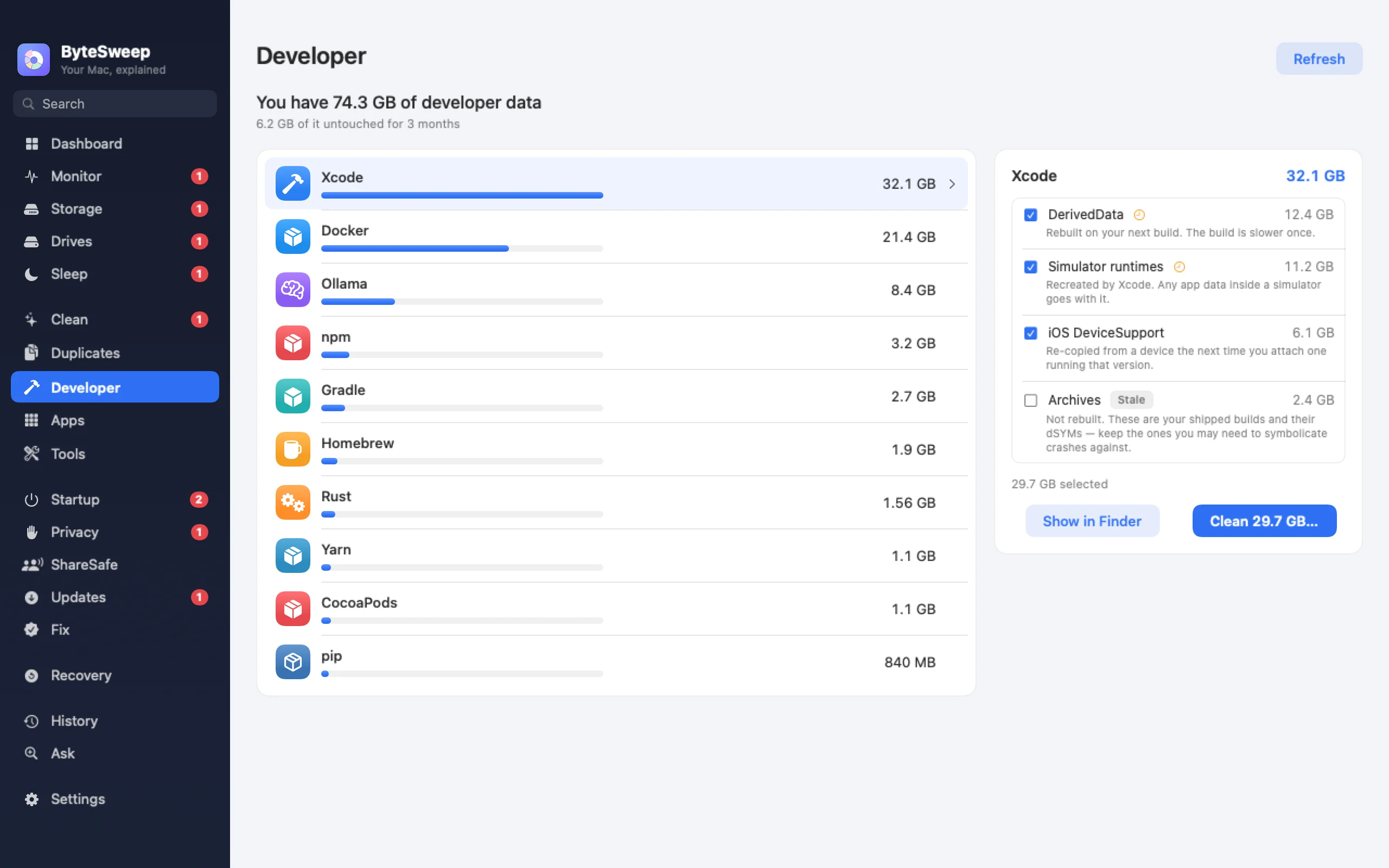
The Developer page in Bytesweep shows the same sizes without the command, grouped by tool, and looking is free.
Each path is the tool's default location on macOS. The last column is the tool's own command for clearing it. Where a tool has one, it is the safest way.
| Tool | It comes back | The tool's own command |
|---|---|---|
Xcode DerivedData~/Library/Developer/Xcode/DerivedData | On the next build | — |
Xcode device support~/Library/Developer/Xcode/iOS DeviceSupport | When you connect a device | — |
Simulator devices~/Library/Developer/CoreSimulator/Devices | Recreated by Xcode, without the app data inside | xcrun simctl delete unavailable |
Xcode Archives~/Library/Developer/Xcode/Archives | Never | — |
Docker Desktop~/Library/Containers/com.docker.docker/Data | When you pull and build again | docker system prune |
npm~/.npm | On the next install | npm cache clean --force |
Yarn~/Library/Caches/Yarn | On the next install | yarn cache clean |
pnpm~/Library/pnpm/store | On the next install | pnpm store prune |
Homebrew~/Library/Caches/Homebrew | On the next install | brew cleanup |
pip~/Library/Caches/pip | On the next install | pip cache purge |
CocoaPods~/Library/Caches/CocoaPods | On the next install | pod cache clean --all |
Gradle~/.gradle/caches | On the next build | — |
Maven~/.m2/repository | On the next build | — |
Cargo~/.cargo/registry | On the next build | — |
Go modules~/go/pkg/mod | On the next build | go clean -modcache |
Playwright~/Library/Caches/ms-playwright | When you install the browsers again | — |
Ollama~/.ollama/models | When you pull the model again | ollama rm |
Hugging Face~/.cache/huggingface | On the next download | — |
The npm, Yarn, pip, CocoaPods, Homebrew, Cargo, Maven and Go caches hold copies of packages that their registries still have. Deleting them costs a download the next time you install, and nothing else.
DerivedData, simulator devices, Gradle caches, the pnpm store, Playwright's browsers and downloaded models all come back, but the first build, test run or pull afterwards takes much longer. Clear the ones that belong to projects you have finished, and leave the ones you are working in.
Xcode Archives are the builds you shipped, with the debug symbols you need to read crash reports from those versions. Nothing rebuilds them.
Docker's data folder holds every image, container and volume you have, and deleting it resets Docker. Use Docker's prune commands, and look at your volumes before you prune those.
A model you built or fine-tuned yourself cannot be downloaded again.
These sit inside each project, not in one shared place, which is why they are forgotten. A project you last opened a year ago still has its node_modules folder, as large as the day you left it.
This command lists every node_modules folder under your home folder with its size:
find ~ -name node_modules -type d -prune -exec du -sh {} + 2>/dev/null | sort -hA node_modules folder is safe to delete when the project still has its package.json and its lockfile, because the install command rebuilds it. The same is true of a Python virtual environment that has a requirements file, and of build output such as target, .next and __pycache__.
The space is in old projects. In the project you are working on, deleting node_modules only costs you a reinstall.
Xcode uses six folders, and one of them must be kept if you ship apps.
Docker Desktop keeps everything in one disk image, and the file does not get smaller when you delete images.
Docker disk space on a Mac: where it goes and how to free it
Ollama, LM Studio and Hugging Face each keep their own model store.
Bytesweep is a Mac cleaner and disk analyzer with a page for developer tools. This is what version 2.1.0 does, and what it leaves to you.
They belong to Xcode, npm, Yarn, pnpm, Cargo, Gradle, Maven, Go, pip, CocoaPods, Homebrew, Playwright, Puppeteer, Ollama, Hugging Face, PyTorch and Docker. It reads those folders directly, so it does not need to scan the whole disk, and it lists the tools with the largest first.
Under every item is one line on how it is rebuilt or downloaded again. Items that are slow to rebuild carry a clock mark, and a location that nothing has changed for three months is marked Stale.
Both are listed and measured, but you have to tick them yourself. Everything else for a tool starts ticked, and the Clean button shows the total it would remove.
Clean shows what will be removed and asks first. The items then go to a restore point on the same disk, and Undo puts them back for seven days.
When you scan your disk, the Categories view groups the node_modules folders, Python virtual environments and build output it found in every project, each with a count and a total, so you can pick out the old ones.
It can run docker system prune, which keeps volumes and anything that is running. It can clear Homebrew's old versions and downloads, clear the npm cache, and delete simulators left behind by Xcode versions you no longer have. These are the tools' own commands, so Undo does not cover them.
Monitor lists running Docker containers with their ports, CPU and memory. Dev Servers lists the Node, Python, Ruby, PHP, Java and Go servers listening on your Mac, each with its project folder, its port and a Stop button.
It does not shrink Docker.raw, and it does not remove anything you have not seen and confirmed. A tool that is not among the twenty locations does not appear on the Developer page, although its folders still show up in the Storage scan.
Yes, when the project has a package.json and a lockfile. Run the install command and the folder is rebuilt with the same versions. Without a lockfile you may get newer versions of your dependencies than you had before.
Xcode Archives, Docker's data folder and its volumes, and any model or dataset you made yourself. None of them can be fetched again from a registry.
No. A cache is a copy of something that can be downloaded or built again. What you pay is time: the next install downloads everything, and the next build starts from nothing.
No. It measures and lists, and it removes only what you tick and confirm. There is no automatic cleaning.
No. Every command on this page is free and does the job. Bytesweep saves you remembering the paths, shows the sizes side by side, and lets you undo a clean-up.