Bytesweep 2.0 for Mac

A native Mac cleaner that also tells you why.

Bytesweep for Mac finds what filled your disk, from System Data to Docker and Xcode, and clears it with a 7-day undo. It also shows why your Mac woke up last night, what starts at login, which apps are out of date and what can use your camera. Written in Swift for Apple silicon and Intel Macs, with no account and no telemetry.

Free to download and scan. Cleaning needs a licence. Runs on Apple silicon and Intel Macs with macOS 14 Sonoma or later.

Updated

What is Bytesweep for Mac?

Bytesweep for Mac is a disk space analyzer, cleaner and system monitor for macOS, built natively in Swift and SwiftUI. It scans your disk, rates everything it finds as safe to clear, worth a look or keep, and moves what you clean to a restore point you can undo for seven days. Around the cleaner it adds modules that answer everyday questions about your Mac: sleep and wake history, startup items, app updates, privacy permissions, running dev servers and file recovery from external drives.

It is not a web app in a window. There is no Chromium inside, it idles quietly in the menu bar, and it asks for each macOS permission only when the module that needs it is opened.

Requirements
MacApple silicon or Intel
macOS14 Sonoma or later
Older macOSmacOS 13 or older: use Bytesweep 1.x
DistributionDirect download, signed and notarised by Apple
Price$5 once, per computer
AccountNone
See it work

Bytesweep for Mac, from scan to clean.

The real app, step by step: see your Mac at a glance, scan the whole disk, pick what to clear, clean it, and undo it if you change your mind.

Bytesweep dashboard with sample data: CPU, memory, network and free space, what can be reclaimed and what needs attention Bytesweep scanning a disk Storage treemap after a scan Storage: the largest files A file's details, with Add to Cleanup, Move to Trash and Delete Permanently The file added to the cleanup list The Clean page with three items in the cleanup list Cleaned, with Undo The review sheet: checked 1,284 files, nothing important found, kept for 7 days
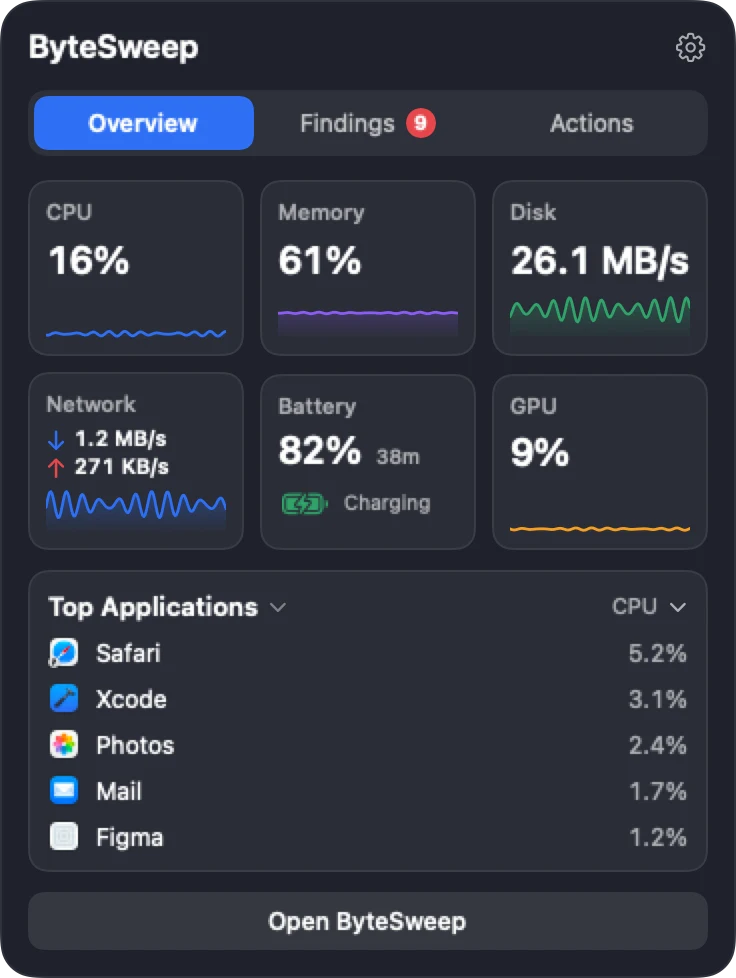
The notch panel: CPU, memory, disk, network, battery, GPU and top applications
Real screens from Bytesweep for Mac, showing sample data.
The notch

Your Mac at a glance, in the notch.

Hover the notch for live CPU, memory, disk, network, battery and GPU, the apps working hardest, and what needs your attention. One click takes you to the right page.

The notch pill: CPU 16%, RAM 61%, SSD 71% and a red badge for something that needs attention The notch panel's Overview: CPU, memory, disk, network, battery and GPU tiles, and the top applications by CPU
Real notch panels from Bytesweep for Mac, showing sample data.
  • Overview. Live CPU, memory, disk, network, battery and GPU, with the apps using the most.
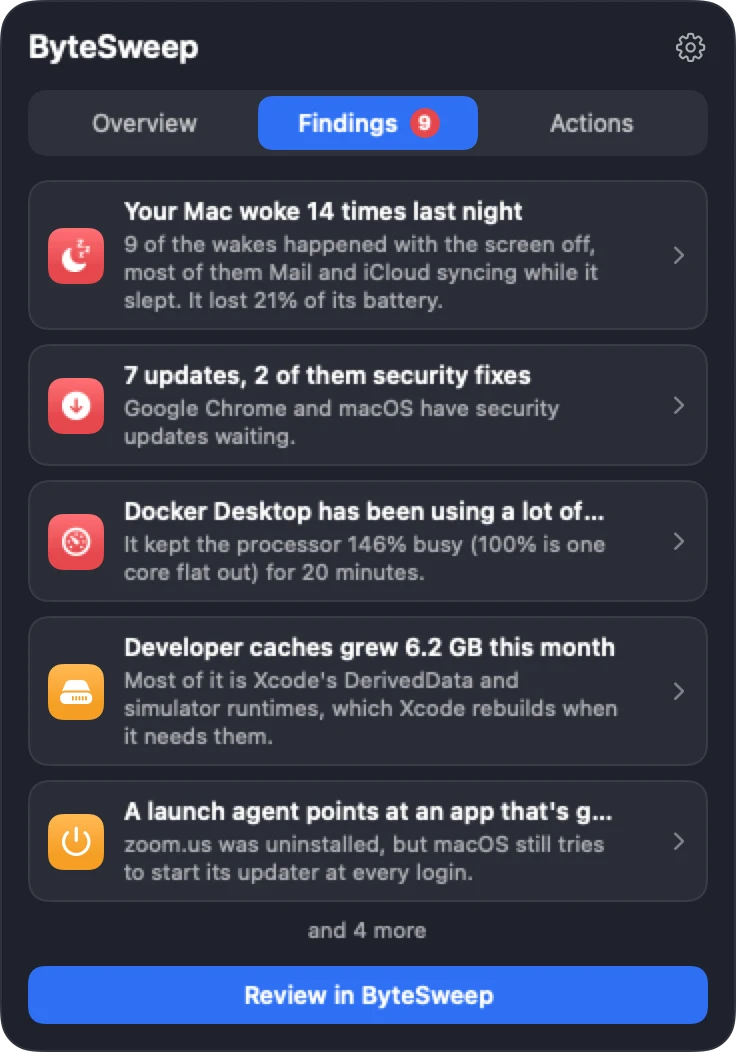
  • Findings. What needs attention, from last night’s wakes to security updates, one click from the page that deals with it.
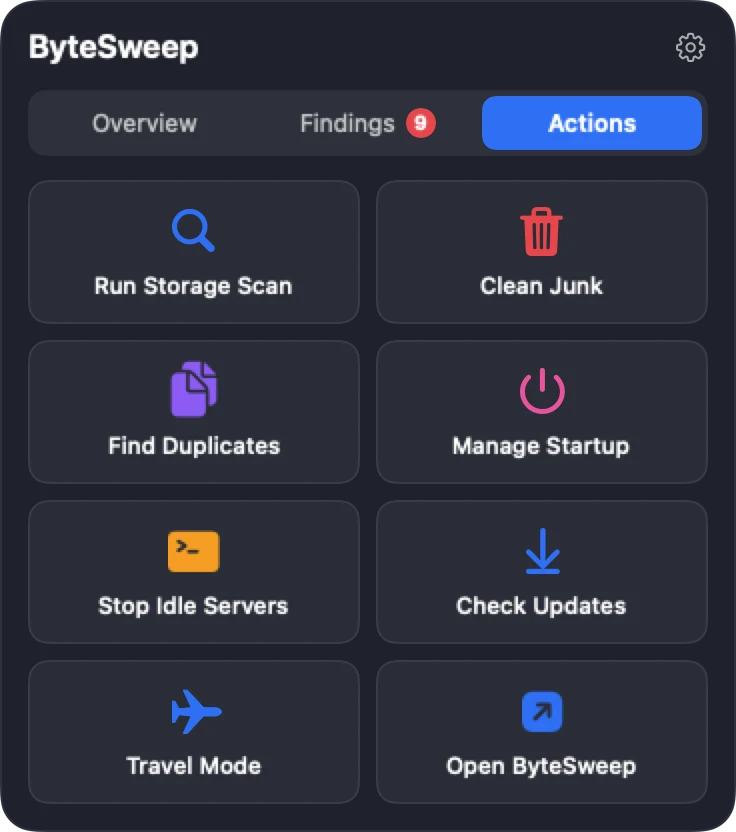
  • Actions. Straight to a storage scan, cleanup, duplicates, startup items, idle dev servers, updates or Travel Mode. Nothing is deleted from the notch itself.
The notch panel's Findings: the Mac woke 14 times last night, 7 updates with 2 security fixes, Docker Desktop using a lot of CPU, developer caches grew 6.2 GB, and a Review button
Findings
The notch panel's Actions: Run Storage Scan, Clean Junk, Find Duplicates, Manage Startup, Stop Idle Servers, Check Updates, Travel Mode and Open Bytesweep
Actions

Off until you turn it on in Settings. On a Mac without a notch, Bytesweep uses a thin strip at the top centre of the screen instead.

How it works

Scan it, see what is safe, clean it, undo it.

The same four steps on every Mac: nothing leaves the disk until you press Clean, and nothing is gone for seven days.

Only on Mac

What the Mac version does that nothing else in one app does.

Sleep and dark wakes

Why did my Mac wake up?

macOS keeps a power log of every sleep and wake but offers no way to read it. Bytesweep turns it into a nightly report: how many times the Mac woke, which wakes happened with the lid shut, what caused each one (a network check, Bluetooth, a scheduled task, an app holding the Mac awake) and how much battery it cost. It keeps the history after macOS rolls the log over, and suggests fixes it can apply and undo.

Travel Mode

Will my battery survive the bag?

One switch stops the wakes that drain a closed MacBook on a trip, and restores your exact previous settings when you turn it off.

Dev Servers

What dev servers are running?

Every Node, Python, Ruby, PHP, Java and Go server listening on your Mac, with the project folder it belongs to, the port, how long it has been idle and a Stop button. Anything inside an app bundle is never treated as a dev server.

ShareSafe

What can people see?

Before a screen share or a presentation: file sharing, screen sharing, remote login, AirDrop, desktop files and notification banners, each checked. It switches off only what it can switch back on, and says plainly what it cannot check.

Notch and menu bar

How is my Mac right now?

A small live graph in the menu bar and an optional panel under the notch that shows what needs attention: 3 wakes last night · Docker holding sleep · +18 GB this week. Macs without a notch get a simulated one.

Mac updates from every source

What's out of date?

Apps that update through Sparkle, the Mac App Store, Homebrew casks and GitHub releases, found and compared in one list. Sparkle updates are installed only when their signature checks out; App Store updates are handed to the App Store.

The Mac storage problem

What is in "System Data" on a Mac?

macOS lumps these into one grey bar and gives you no way in. Each is a real folder that Bytesweep finds, measures and names, with a verdict on whether it is safe to clear.

Time Machine local snapshots

Hourly snapshots kept on the internal drive. Often the largest single slice, and the one people never find.

Xcode DerivedData

Build intermediates that grow forever. Twenty to sixty gigabytes on a working developer's Mac is normal.

iOS simulators and device support

Old simulator runtimes and symbol caches for iPhones you no longer own.

iPhone backups

Local backups in MobileSync, often tens of gigabytes, dated so you can keep the newest.

Docker.raw

One disk image that quietly reaches 40 GB and never shrinks on its own.

App caches and containers

Browsers, Spotify, Slack and every sandboxed app, matched back to the app that made them.

Mail attachments

Years of downloaded attachments kept locally by Mail.

Leftovers from deleted apps

Support files, preferences and launch agents from apps you dragged to the Trash years ago.

Homebrew, pip and npm caches

Package caches that rebuild themselves, cleared with the tool's own command rather than a blind delete.

Read the full System Data guide →

Also on Mac

Everything else in Bytesweep for Mac.

  • Storage analyzer. Treemap, sunburst, flame graph, bubbles and a sorted list of any disk or folder.
  • Clean. Caches, logs and build outputs rated safe, review first or keep, with a 7-day undo.
  • Duplicates. Identical files, similar photos and videos, and duplicate folders.
  • Apps. Uninstall with every leftover, and find leftovers of apps already gone.
  • Developer. Xcode, Docker, node_modules, Homebrew, pip, npm, Gradle and Cargo caches.
  • Startup. Login items and launch agents, including ones that point at deleted apps.
  • Privacy. Which apps can use the camera, microphone, screen recording and your files.
  • Monitor. CPU, memory, disk, network, GPU, battery, temperatures and fans, per-app network use, history from five minutes to 30 days, and alerts when an app misbehaves.
  • History and Ask. A timeline of what changed, searchable in plain questions, on your Mac.
  • Drives. An offline, searchable catalog of your external drives.
  • Recovery. Deleted files from USB sticks, SD cards, external drives and disk images.
  • Fix. One ranked list of what is worth doing first.

See every module →

FAQ

Bytesweep for Mac, answered.

Is Bytesweep a good CleanMyMac alternative?

For storage, yes. Bytesweep covers disk analysis, junk and cache cleanup, duplicates, app uninstalling, startup items and app updates, for a one-time $5 instead of a subscription. It adds a 7-day undo on every cleanup and sleep history, which CleanMyMac does not have. It does not include a malware scanner. See the full comparison.

Does Bytesweep work on Intel Macs?

Yes. Bytesweep 2.0 is a universal app for Apple silicon and Intel Macs running macOS 14 Sonoma or later. On macOS 13 or older, use Bytesweep 1.x.

Is it safe to delete System Data on a Mac?

Not as a whole. Parts of it are caches and snapshots that rebuild themselves, and parts are files your apps need. Bytesweep separates the two, pre-selects only the safe parts and keeps a restore point so you can undo for seven days.

Why does my Mac wake up while it is asleep?

Most wakes are dark wakes: the Mac wakes briefly with the screen off to check mail, sync, reach Bluetooth devices or run scheduled tasks, and an app can also hold it awake. macOS records each one in its power log. Bytesweep's Sleep module reads that log and names the cause of every wake.

What permissions does Bytesweep need on a Mac?

None at launch. Full Disk Access is requested when a module first needs it, and administrator approval only for the few tools that change system settings. Each request explains why before macOS shows its own prompt.

Does Bytesweep for Mac use the internet?

Only for two things: activating your licence with Dodo Payments, our payment provider, and the Updates module, which reads your apps' own update feeds and Apple's App Store lookup and lists every host first. Everything else works offline. There is no telemetry.

Download Bytesweep for Mac free.

Scan free and see every verdict. When you want to clean, one payment of $5 unlocks it on that computer.