 Bytesweep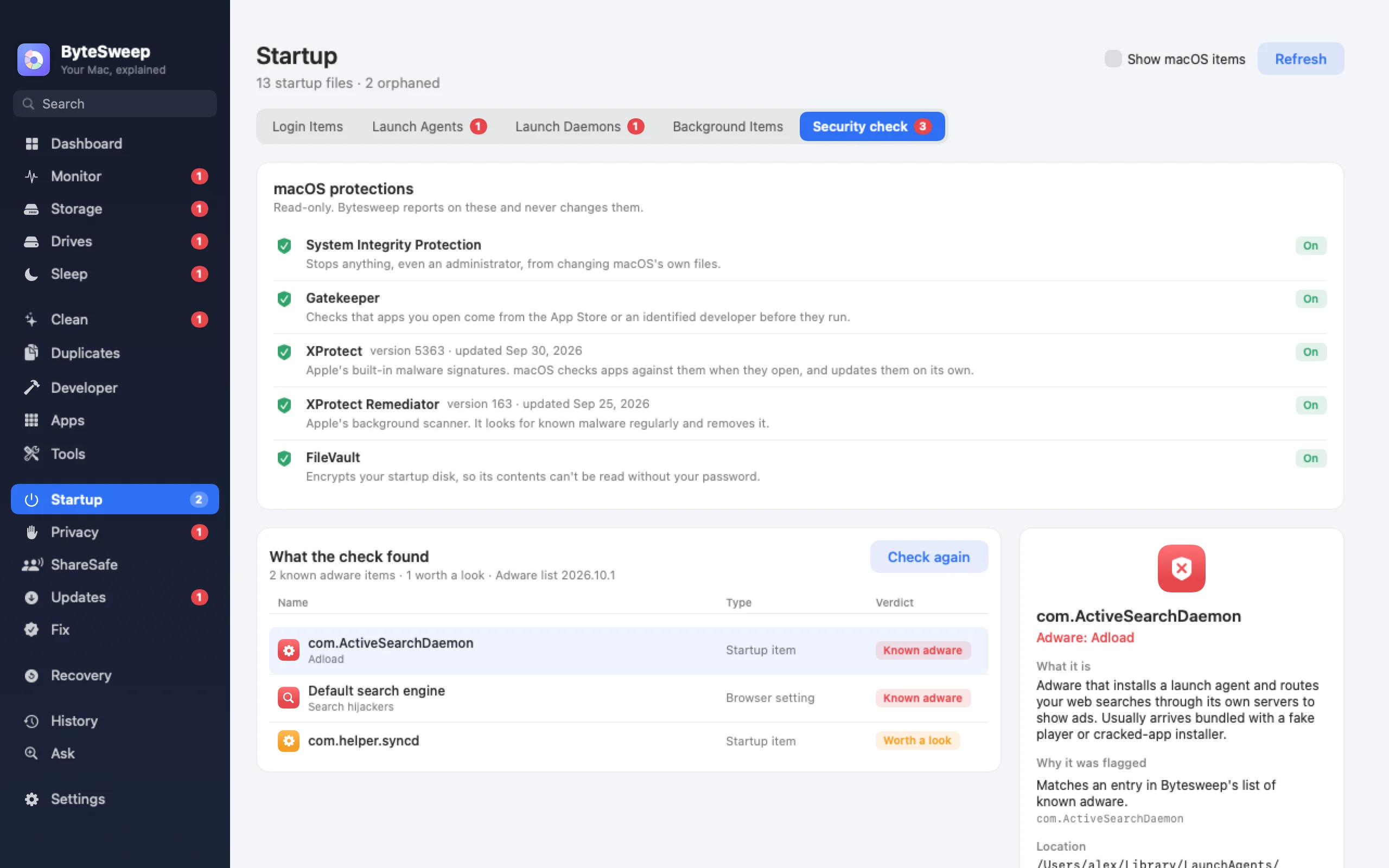
Every startup item, explained
On a Mac: your launch agents, launch agents for all users, launch daemons and macOS's own. On Windows: Run keys and the Startup folder, services and scheduled tasks. Each shows the app it belongs to, who signed it, and whether its program still exists.
Items that point at an app you deleted are flagged, because they do nothing except fail at every login.
Switch off what you do not need
On Windows, switch services and scheduled tasks off and on again, and go straight to Windows Settings to turn startup apps off; Microsoft and security software entries are shown but never changed. On a Mac, your own launch agents can be switched off and back on, and system-wide items are explained with a way to find them.
A local adware check (new in 2.1)
Bytesweep compares what starts on your computer with a list of known adware families, browser hijackers and fake cleaners, such as Adload, Pirrit and Genieo on a Mac, or Conduit, Babylon and OneLaunch on Windows. It also flags unsigned programs running from temporary or hidden folders. The list ships with the app; nothing is uploaded.
It also shows whether your built-in protections are on: SIP, Gatekeeper, XProtect and FileVault on a Mac; Defender, the firewall, SmartScreen, BitLocker and UAC on Windows.
What it is not
This is not an antivirus. It does not scan files for malware or watch in real time. It is a focused check of the places adware hides, next to the protection your system already has.
On Mac and on Windows
| Mac | Windows | |
|---|---|---|
| Startup items listed and explained | Yes | Yes |
| Switch items off and on | Your own launch agents | Services and tasks; startup apps in Windows Settings |
| Items pointing at deleted apps | Yes | Yes |
| Local adware check | Yes | Yes |
| Built-in protection status | SIP, Gatekeeper, XProtect, FileVault | Defender, Firewall, SmartScreen, BitLocker, UAC |
Bytesweep vs KnockKnock and Autoruns
| Bytesweep | KnockKnock | Autoruns | |
|---|---|---|---|
| Price | $29.99 once, with every other tool | Free | Free |
| Platforms | Mac and Windows | Mac | Windows |
| Known adware check | Yes | Via VirusTotal | Via VirusTotal |
| Uploads hashes anywhere | No | Optional | Optional |
For deep inspection, KnockKnock and Autoruns cover more persistence locations; Bytesweep explains the common ones in plain words.
Questions
Is it safe to switch off startup items?
Mostly. Bytesweep never changes Microsoft, Apple or security software entries, and anything you switch off can be switched back on.
Is Bytesweep an antivirus?
No. It checks for known adware and suspicious startup items with a local list, and shows your built-in protection. Keep your system's own protection on.
Does the check send my files anywhere?
No. The list is bundled with the app and the check runs entirely on your computer.