 Bytesweep
 Docker is taking up space on my Mac
Docker Desktop keeps everything in one file. It grows every time you build, and deleting images does not make it smaller. Here is why, and what actually reclaims the space.
14-day free trial, no card needed. Then $15 once for 3 computers, macOS and Linux.
Where the space is
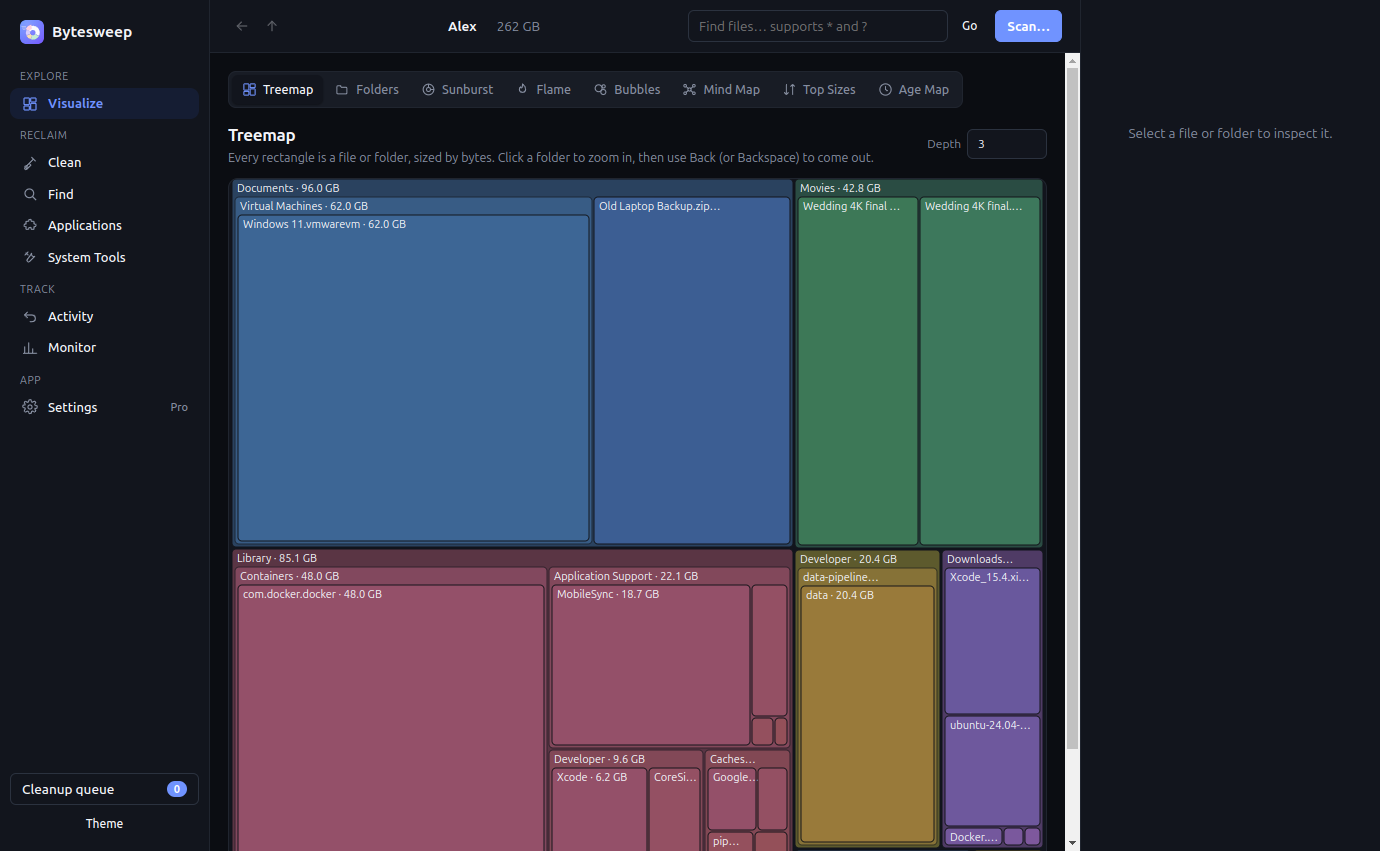
Docker Desktop on macOS runs a Linux VM, and that VM's whole filesystem is a single sparse file on your Mac:
~/Library/Containers/com.docker.docker/Data/vms/0/data/Docker.rawCheck its real size on disk — not its logical size, which is always the maximum you allowed Docker to use:
du -h -d0 ~/Library/Containers/com.docker.docker/Data/vms/0/data/Why deleting images does not shrink it
Removing an image frees blocks inside the VM's filesystem, but the file on your Mac keeps its size — it has already claimed that much from macOS. Recent Docker Desktop versions issue TRIM from inside the VM, which lets macOS reclaim the freed blocks, but it happens on Docker's schedule rather than the moment you prune. Until then, docker system df reports gigabytes freed while the Finder reports no change at all.
Getting the space back
In order: least destructive first.
1. See what Docker thinks it is using
Always start here. It splits images, containers, volumes and build cache, and tells you how much of each is reclaimable.
docker system df -v2. Clear the build cache
On a machine that builds images regularly this is usually the biggest single item, and it is the safest to remove — it only makes the next build slower.
docker builder prune -a3. Prune what is genuinely unused
Stopped containers, dangling images and unused networks:
docker system pruneAdd -a to also remove every image not used by a running container — that means re-pulling them later. Only add --volumes if you are certain: volumes are where databases keep their data, and that is the one command on this page that destroys something you cannot re-download.
4. List volumes before you touch them
Check what would actually go:
docker volume ls
docker volume ls -f dangling=true
Docker is rarely the only thing
You can run every command on this page, and on the same Mac Xcode DerivedData and a few forgotten model weights are usually just as large. Bytesweep measures Docker's real size on disk beside all of them in one ten-second pass, so you fix the disk once instead of chasing it one tool at a time.
5. Make macOS reclaim the file
After pruning, Docker Desktop has a supported way to return the freed blocks: Settings → Resources → Advanced → Disk usage, or quitting and reopening Docker Desktop, which triggers TRIM on start. Give it a minute and re-check the file size before deciding it did not work.
6. Lower the disk limit
In Settings → Resources, the virtual disk limit is how large Docker.raw is permitted to grow. Reducing it does not free anything on its own, but it caps the problem. Raising it "just in case" is why the file reached 64 GB in the first place.
7. The last resort
Settings → Troubleshoot → Clean / Purge data resets the VM's disk completely and returns the file to near zero. It deletes every image, container and volume you have. Use it when nothing else worked and you know what is in your volumes.
Do not delete Docker.raw in the Finder. It is not a cache file — it is the entire Docker installation's data, and removing it while Docker is running can leave the VM in a state that needs a reset anyway.
Also worth checking
Docker is rarely alone
On the Mac where Docker reached 50 GB, Xcode's DerivedData and local AI models are usually close behind. If you are reclaiming space, it is worth measuring the whole disk once rather than fixing one thing at a time. The full list →
On Linux there is no image file
Docker on Linux writes straight into /var/lib/docker, so a prune frees space immediately and none of the TRIM problem above applies. Linux disk cleanup →
See Docker next to everything else
Bytesweep measures Docker's real size on disk, shows it beside Xcode, simulators, node_modules and model weights, and marks what is safe to clear — without touching your volumes.
Questions
Is it safe to delete Docker.raw?
Not from the Finder, and not while Docker is running. That single file is every image, container and volume you have. If you genuinely want to start clean, use Docker Desktop's Troubleshoot → Clean / Purge data, which does the same thing in a way Docker knows about.
Why does docker system prune say it freed 20 GB when nothing changed?
Because it freed 20 GB inside the VM's filesystem, not on your Mac. The file keeps its size until TRIM runs and macOS reclaims the blocks. Quitting and reopening Docker Desktop usually triggers it.
Does docker system prune delete my databases?
Only if you add --volumes. Without that flag it leaves volumes alone. With it, any volume not attached to a container goes, and a stopped database's volume counts as unattached.
How big should Docker.raw be?
There is no right answer, but on a machine with a handful of active projects, 15 to 25 GB is normal and 60 GB means the build cache has never been cleared. Check with docker system df -v before assuming it is images.