 Bytesweep
 | Command | Stopped containers | Unused networks | Dangling images | All unused images | Build cache | Volumes |
|---|---|---|---|---|---|---|
docker system prune | Yes | Yes | Yes | No | Unused | No |
docker system prune -a | Yes | Yes | Yes | Yes | All unused | No |
docker system prune --volumes | Yes | Yes | Yes | No | Unused | Unused anonymous |
docker volume prune -a | No | No | No | No | No | Unused named too |
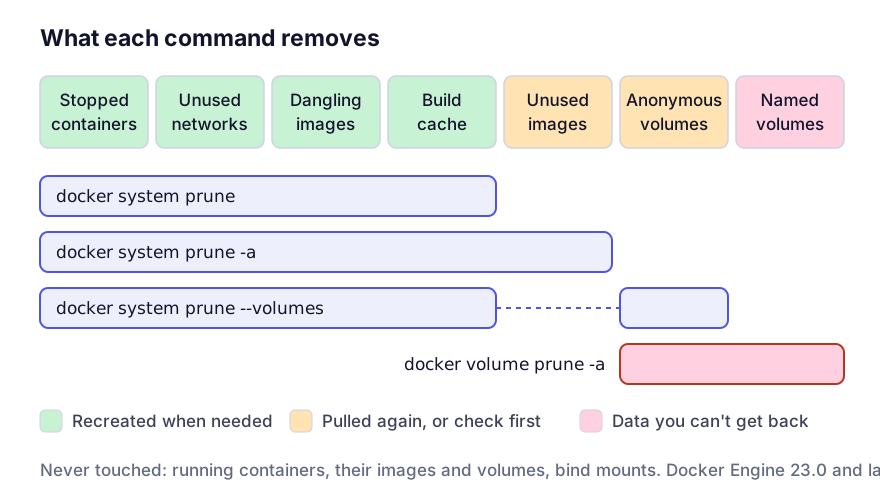
Dangling and unused are narrower than they sound
A dangling image is one with no tag, usually the old copy left behind when you rebuilt an image under the same tag. That’s all plain prune removes from your images, so on a machine with fifty tagged images it often frees less than a gigabyte and leaves you wondering why you bothered.
Unused, the set -a works on, means any image that no container refers to, stopped containers included. That covers images you pulled on purpose and will want tomorrow. Nothing is lost for good, since everything can be pulled again, but the next morning might start with a 20 GB download.
Volumes: check your engine version
A named volume is where a container keeps data meant to outlive it: the Postgres data directory in your dev stack, the MySQL one, an Elasticsearch index, whatever your local MinIO holds.
Since Docker Engine 23.0, volume pruning removes only anonymous volumes (the ones with a 64-character hash for a name) unless you ask for more. docker system prune --volumes uses that default, so on a current engine it leaves named volumes alone. docker volume prune -a does not: it removes every volume not attached to a container, named or anonymous. Engines older than 23.0 treated --volumes that way too, and Podman’s prune still does.
“Not attached” is the trap. Run docker compose down and every volume in the project is unattached. Prune at that moment with the wide form and the database is gone. There’s no trash and no undo; the directory inside Docker’s virtual machine is simply removed.
Before any prune that can touch volumes, run docker volume ls and read the list. If you recognise a name, you probably want what’s in it.
Backing one up takes seconds:
docker run --rm -v pgdata:/from -v "$PWD":/to alpine \
  tar czf /to/pgdata.tgz -C /from .
Telling a dead volume from a live database covers identifying them without guessing from the names.
Run the narrow commands first
Find out which category is actually big, then use the smallest command that deals with it:
docker system df          # summary by category
docker system df -v       # itemised, largest first
In increasing order of commitment:
docker container prune                      # stopped containers only
docker image prune                          # dangling images only
docker builder prune --filter until=168h    # build cache older than a week
docker image prune -a --filter until=720h   # unused images older than a month
The last two are what I’d run on most machines. They clear out the old stuff and keep this week’s work. One catch: for images, until compares against when the image was created, not when you last used it. A base image built two years ago and used this morning still matches until=720h if no container refers to it, so expect to pull it again.
The build cache usually needs the most attention, because it is often the largest single item and it keeps growing. Bounding the BuildKit cache sets a ceiling so you stop doing this by hand.
Running containers, their images and the volumes attached to them are exempt from every form of the command. So are bind mounts, which are ordinary host directories.
Why the Mac’s free space doesn’t change
On macOS all of this happens inside a Linux virtual machine whose disk is a single file. Pruning frees space inside that file. Whether macOS gets it back depends on that file being trimmed afterwards, which shrinking Docker.raw walks through.
Questions
Can I recover a pruned volume?
No. A backup taken beforehand is the only way back.
Is docker system prune -a fine on a CI machine?
Yes, and it’s the right call there. CI has no local state worth keeping, and the cost is re-pulling base images, which is what a registry cache is for.
Why did prune report 30 GB reclaimed when I have few images?
That figure includes the build cache. On a machine that builds a lot, unused cache is often most of it.