 ByteSweep
 Bytesweep Storage Cleaner for Android · version 1.3.0
Free up Android space without losing a photo you care about.
Find similar shots and duplicates, shrink big videos, swipe through old months, and see which apps you never open. Every screen works the same way: select, review, clean. Nothing goes until you confirm, and all of it happens on the phone.
- Android 11 or later
Free to start. Every feature works within your first 1 GB and 30 items. After that, one one-time purchase removes the cap. No subscription, no renewal.
Everything the iPhone app does, made for Android.
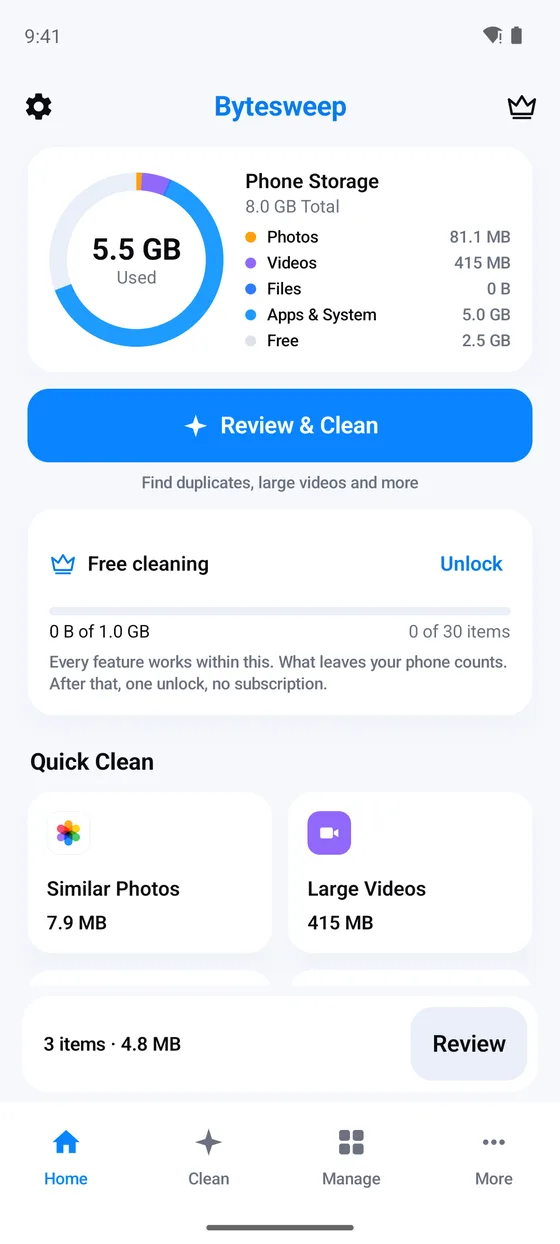
Four simple tabs, shrinking for videos and photos, one way to clean on every screen, and tools for the apps on your phone.
Scan results
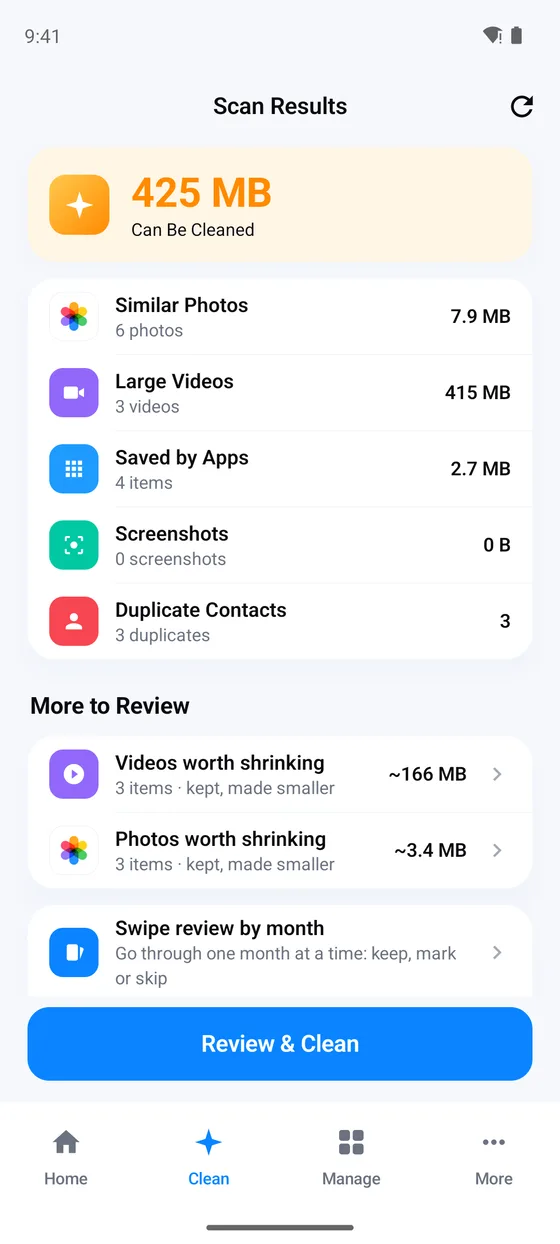
Everything that can go, sized up
One scan sorts your phone into similar photos, large videos, what chat apps saved, screenshots and duplicate contacts, each with its size. Videos and photos worth shrinking are listed apart, so you can look at them before deciding.
- Exact duplicates, slow-motion videos and motion photos, found for you.
- Size and age filters on every list, to find the big, old things first.
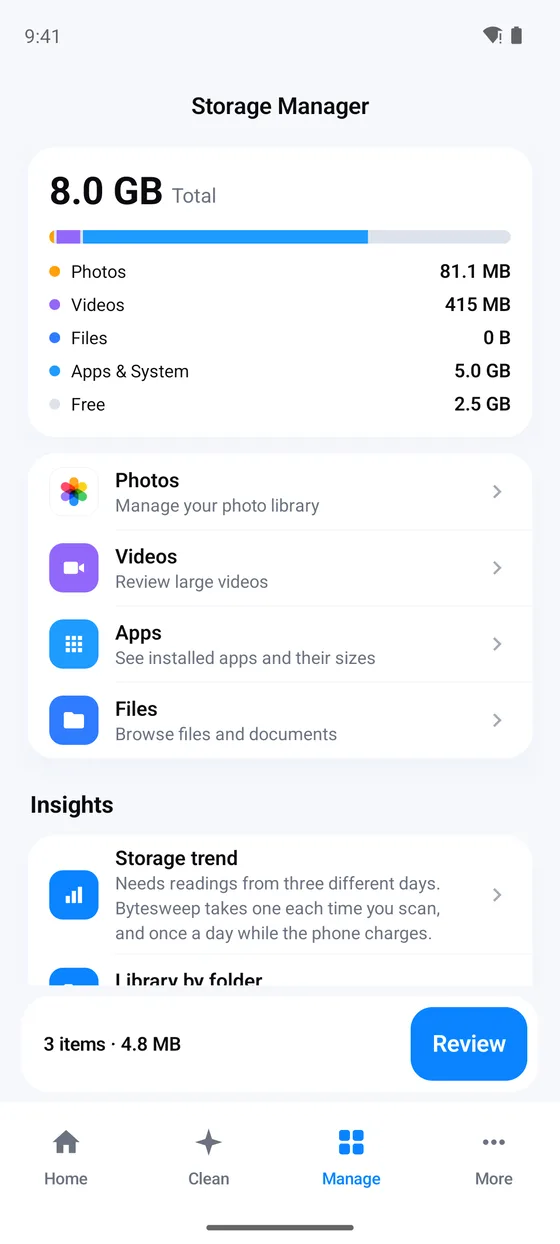
- A storage ring on Home that splits photos, videos, files and apps.
Select, review, clean
One last look, on one screen
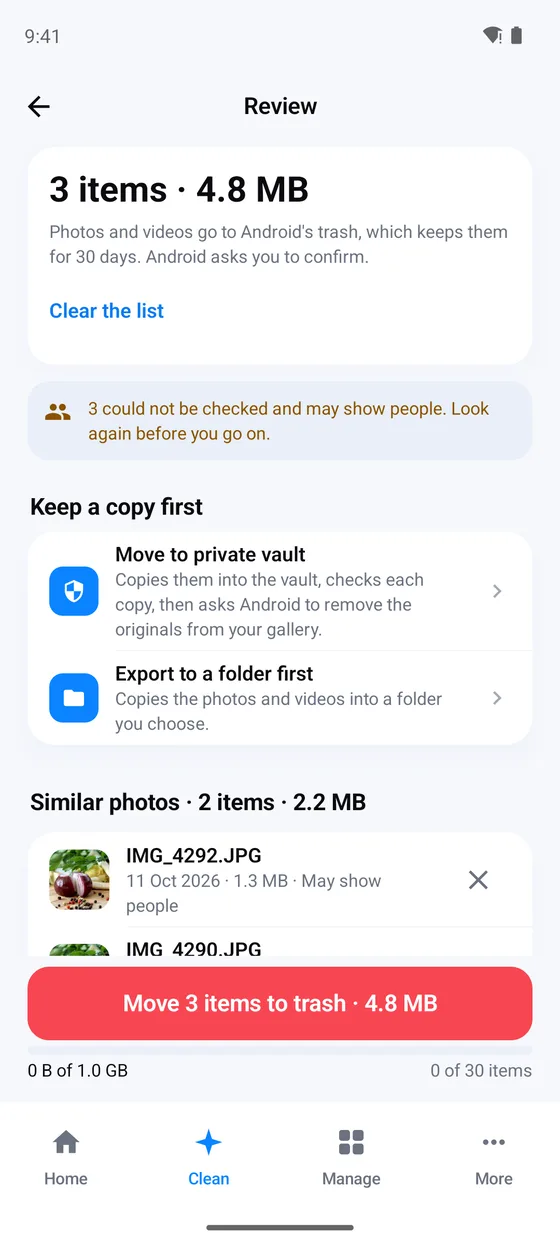
Tap what you want gone on any list. Review then shows all of it together with its size, and warns you about photos that may show people. Nothing leaves your gallery until you confirm there.
- Move to the private vault or export to a folder first, instead of only deleting.
- Photos and videos go to Android's trash for 30 days, and Android asks you to confirm.
- A note the day before the trash empties, while you can still put things back.
Similar photos and duplicates
Keep the best shot, let the rest go
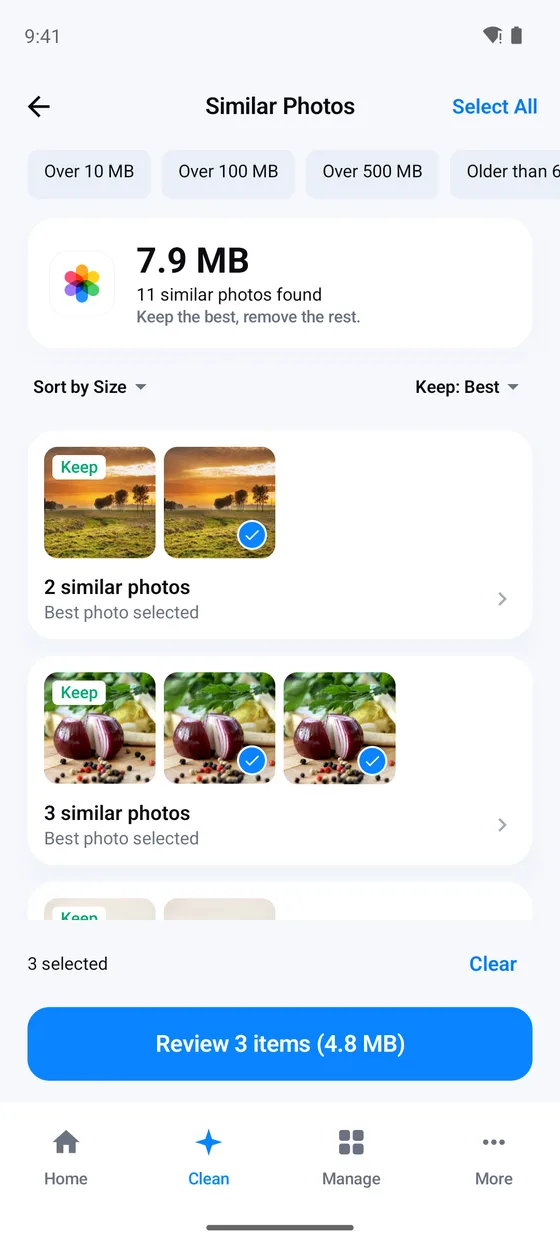
Near-identical shots are grouped and the best one is marked Keep. The copy marked Keep is never selected for you; press and hold any picture to see it full size.
- Exact duplicates: keep the highest quality, the newest or the oldest copy.
- How strict the look-alike matching is: Strict, Normal or Loose.
Shrink videos and photos
Keep the moment, get the space back
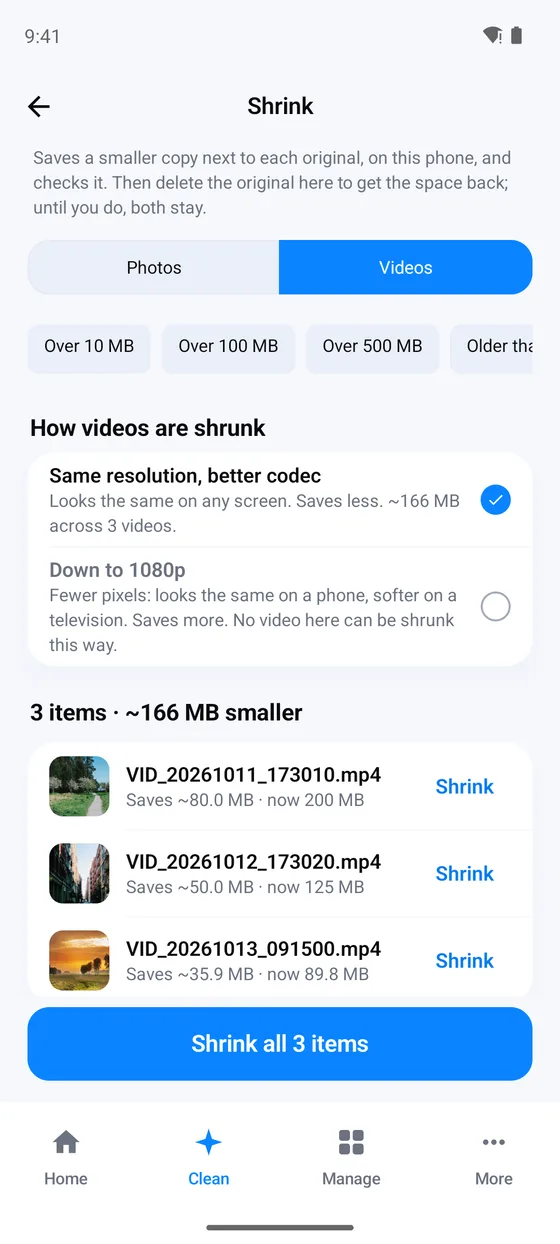
Bytesweep saves a smaller copy of a large video (same resolution with a better codec, or down to 1080p) or a large photo (Smaller, Balanced or Sharper), checks it, and leaves the original for you to delete. Until you do, both stay.
- Each item says what it saves, for example about 80 MB off a 200 MB video.
- Shrink one, or the whole list.
- Keep a motion photo as a still, with its date and place.
Swipe review
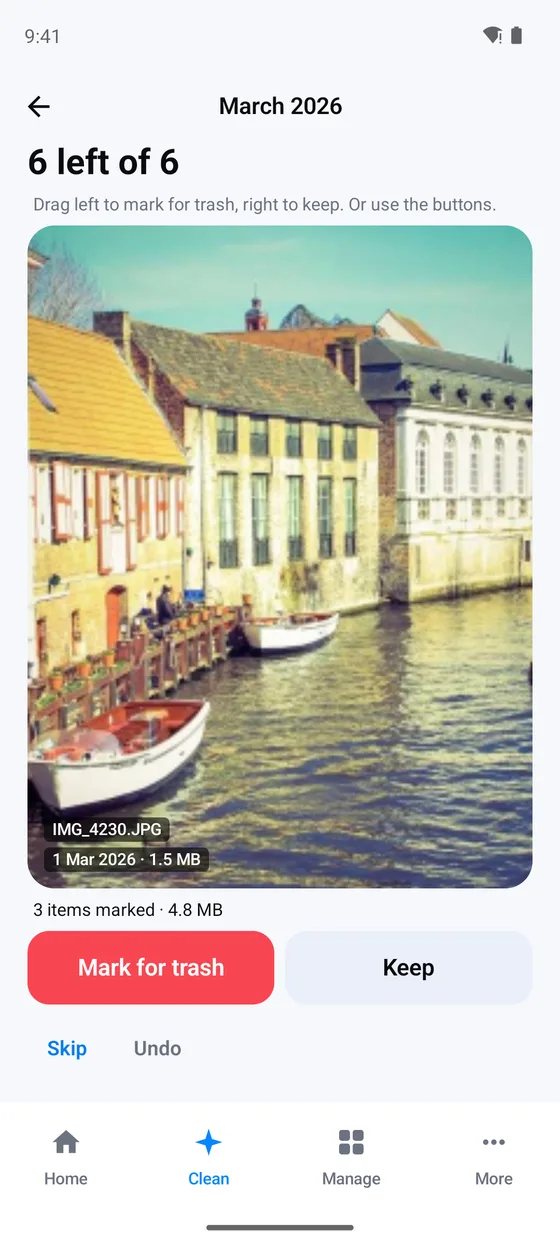
A year of camera roll, a month at a time
Pick a month and go through it one photo or video at a time. Drag left to mark it, right to keep it, and undo any decision. A swipe only marks: nothing leaves your library until you move it to the trash from Review.
Saved by apps
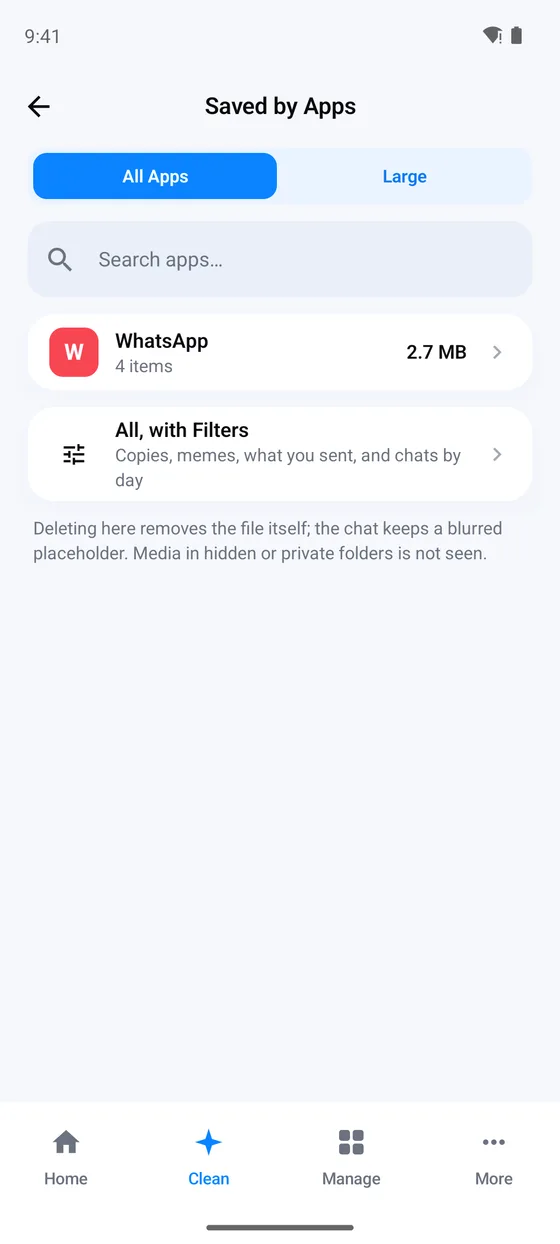
What your chats left behind
Chat and social apps save every photo, video and voice note they receive into their own folders. Bytesweep lists them by app, so you can clear old forwards and memes without opening each chat.
- Filters for copies, memes, what you sent, and chats by day.
- Voice notes and audio, recordings and big audio files, in their own list.
- Deleting removes the file itself; the chat keeps a blurred placeholder.
Contacts and calendar
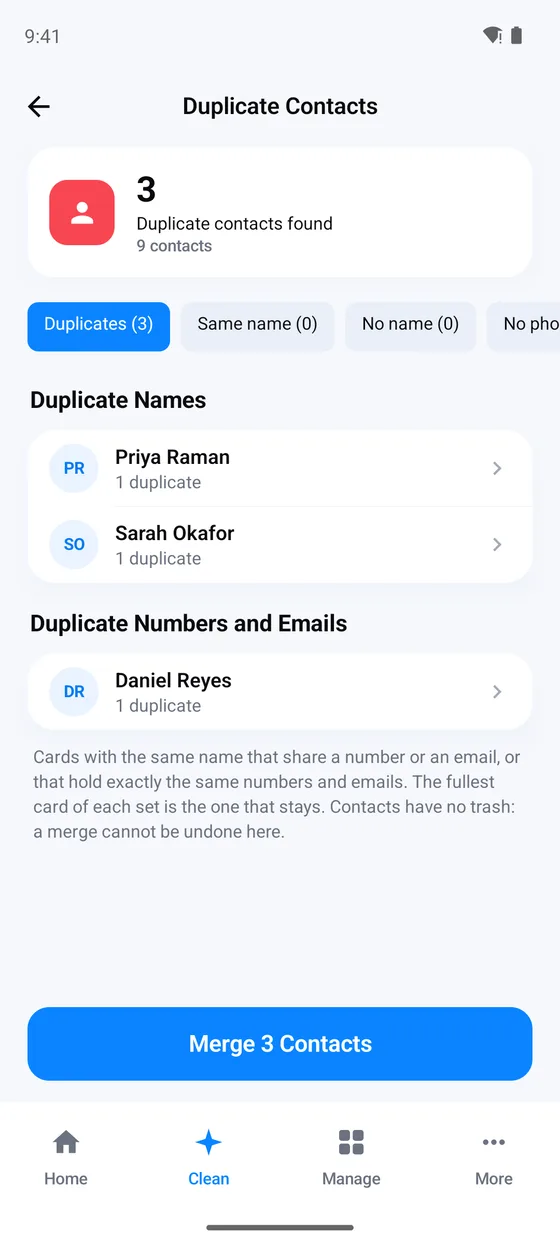
Contacts saved twice, merged once
Cards with the same name that share a number or email are merged into the fullest one, which gains the others' numbers, emails and addresses. Clear cards with no name or no way to reach anyone, and old or duplicate calendar events the same way.
Contacts and calendars have no trash on Android, so a merge or removal there is permanent, and Bytesweep asks first. Contacts are clutter, not storage: clearing them frees almost no space.
Apps and storage
See where the rest of the space went
The Manage tab breaks down your storage and goes beyond photos: the apps you have not opened in 90 days, how big each app is and where it came from, and which apps hold the most cache.
- Unused apps, with an uninstall button that hands you to Android.
- Downloads and files: installers, archives and big files you pick.
- Storage trend over time, app permissions and screen time per app.
Everything in Bytesweep Storage Cleaner for Android
Scanning, every figure and every group are always free, and every feature works free within your first 1 GB and 30 items, whichever comes first. Anything tagged purchase is capped at that allowance until Bytesweep Pro, one one-time in-app purchase you can restore on any Android phone signed in to the same Google account.
Photos
- Similar photos, grouped, the best one kept
- Exact duplicates, keeping the highest quality, newest or oldest copy
- Screenshots, by day, whatever their age
- Swipe review: a month at a time, one photo or video at a time
- Search photos by what they show or say
- Smart groups: likely receipts, food, pets and selfies, and photos of documents
- Move to trash what you select, after Review purchase
Videos and files
- Large videos by size, date, length or resolution, and slow motion
- Saved by apps: what chat and social apps saved
- Shrink videos: same resolution or 1080p purchase
- Shrink photos: Smaller, Balanced or Sharper purchase
- Motion photo as a still, with its date and place
- Voice notes and audio, downloads and files
- Export to a folder purchase
Contacts and calendar
- Merge duplicate contacts, clear ones with no name or way to reach anyone
- Old and duplicate events purchase
Privacy
- Private vault: encrypted copies inside Bytesweep, behind your screen lock purchase
- Privacy scan: photos that carry a location or camera details
- App permissions: which apps can use the camera, microphone and location
- No account, no analytics, nothing uploaded
Storage at a glance
- Storage ring on Home and a storage trend
- Cleanup history and a Recently deleted screen for what Bytesweep moved
Apps and device
- Unused apps: not opened in 90 days
- App sizes, install source and last use
- App caches: which apps hold the most
- App usage: screen time per app this week
- Device: battery, memory and storage readings
Shortcuts and reminders
- A home screen widget and a Quick Settings tile for free space
- A trash reminder the day before it empties, and a weekly review reminder
What is Bytesweep Storage Cleaner for Android?
Bytesweep Storage Cleaner is an Android app that finds similar and duplicate photos, large videos, what chat apps saved, screenshots and duplicate contacts, shrinks big videos and photos, and removes things only after you review them. It also shows which apps you never open and which hold the most space.
It is the Android companion to Bytesweep for Mac and Windows and to Bytesweep Storage Cleaner for iPhone, built on the same rule: nothing is removed until you have seen it, and nothing leaves the phone.
| Version | 1.3.0 |
|---|---|
| Requires | Android 11 or later |
| Free | Scanning, every figure and group, and every feature within your first 1 GB and 30 items |
| After that | One one-time purchase removes the cap, no subscription |
| Account | None |
| Uploads | None. No server, no analytics |
| Undo | Photos and videos stay in Android's trash for 30 days |
What no Android cleaner can do.
-
Clear other apps' caches
An app from Google Play cannot read or clear other apps' private files and caches, or what Android keeps for itself. Any app claiming a one-tap cache clean is counting something else. Bytesweep shows which apps hold the most, so you can clear them in Android's settings.
-
Free space instantly
Photos and videos go to Android's trash for 30 days, and that space counts as used until it is emptied. Bytesweep tells you so, and its Recently deleted screen can empty it or put things back.
-
Delete without asking
Nothing is ever removed automatically. Review shows everything first, and Android itself asks you to confirm each move to the trash.
Bytesweep for Android, answered.
Is Bytesweep Storage Cleaner free on Android?
Yes, to start. Scanning, every figure and every group are always free, and every feature works free within your first 1 GB and 30 items, whichever comes first. After that, one purchase, Bytesweep Pro, removes the cap on moving to the trash, shrinking, the private vault, exporting to a folder and cleaning out the calendar. You pay once: no subscription, no renewal.
Does it upload my photos?
No. There is no account and no analytics. Your library is read on this phone and stays on it, unless you share or export something yourself.
Will shrinking a video lose it?
No. Bytesweep saves a smaller copy next to the original, on the phone, and checks it. The original stays until you delete it.
Why is the space not back yet?
What sits in Android's trash still takes room until it is emptied, after 30 days or when you empty it in Bytesweep's Recently deleted screen.
Why does Android ask me to confirm?
Android shows its own confirmation whenever an app moves your photos or videos to the trash. Bytesweep cannot skip it, and would not want to.
I have a new phone. Do I pay again?
No. Tap Restore Purchases on any Android phone signed in to the same Google account. The iPhone app is a separate purchase in Apple's App Store.
A cleaner Android phone, on your terms.
Download free, clean your first 1 GB free, and pay once only if you want more.
On another device? Bytesweep for iPhone · Bytesweep for Mac · Bytesweep for Windows
Updated