 Bytesweep
 The cache isn’t the same thing as image layers. Layers belong to images and go when the image goes. Cache records are BuildKit’s own store and survive the deletion of every image on the machine, which is why removing images barely touches this number.
Look at it before you delete it
docker system df
docker buildx du
docker buildx du --verbose | head -40
docker buildx du is the one worth learning. The verbose form lists each cache record with its size, when it was last used, whether it’s shared between builds and whether it’s in use right now. A few minutes with it tells you whether you’re dealing with one enormous record or ten thousand small ones.
When a single build adds 10 GB, the cause is usually a large build context, a cache mount full of package downloads, or early stages of a multi-stage build that produce big intermediates. The verbose listing shows which.
Prune by age, not all at once
Wiping the whole cache makes the next build of every project cold, and a multi-stage Rust or Node build can go from a minute or two warm to a quarter of an hour cold. Pruning by age is almost always the better deal:
docker builder prune --filter until=168h     # anything not used for a week
docker builder prune --keep-storage=20GB     # trim down to a 20 GB ceiling
docker builder prune -a                      # all unused cache, not just dangling records
For cache records, until goes by when a record was last used, which makes it more forgiving than the same filter on images (where it’s the creation time). A year-old base layer that every build still touches stays.
docker system prune also clears unused build cache, which is why it sometimes reports a startlingly large number reclaimed.
Give it a ceiling so you stop doing this by hand
Whether the cache has any ceiling depends on how you build. Docker Engine garbage-collects the builder’s cache, and Docker Desktop’s default engine configuration sets the limit to 20 GB. A builder you made yourself with docker buildx create runs its own BuildKit with its own settings, and a hand-edited engine config may have dropped the limit altogether. Check which builder you’re using with docker buildx ls.
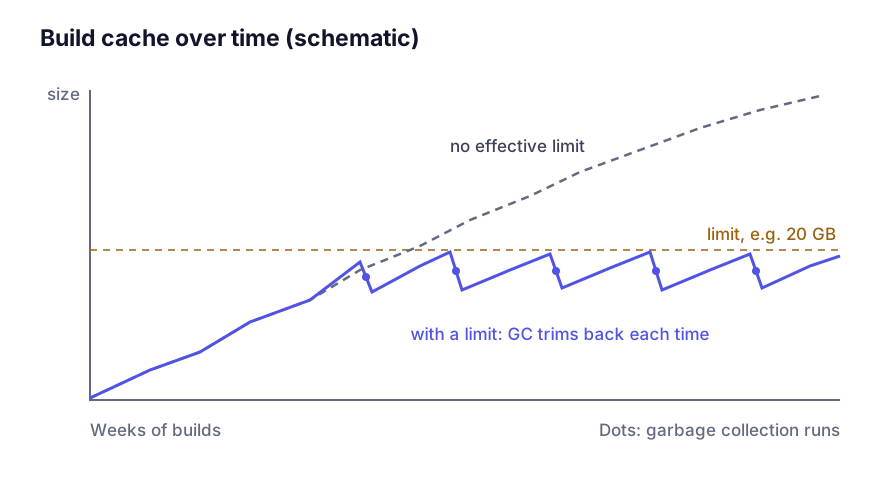
For the default builder, the setting lives in the engine’s JSON configuration: /etc/docker/daemon.json on Linux, or Settings, Docker Engine in Docker Desktop:
{
  "builder": {
    "gc": {
      "enabled": true,
      "defaultKeepStorage": "20GB"
    }
  }
}
A standalone BuildKit, or a builder created with docker buildx create --buildkitd-config buildkitd.toml, reads buildkitd.toml instead (/etc/buildkit/buildkitd.toml by default), where you can also set policies:
[worker.oci]
  gc = true
  maxUsedSpace = "20GB"

  [[worker.oci.gcpolicy]]
    maxUsedSpace = "5GB"
    keepDuration = "48h"
    filters = ["type==source.local", "type==exec.cachemount"]

  [[worker.oci.gcpolicy]]
    maxUsedSpace = "20GB"
Policies are applied in order, and once you list any, the maxUsedSpace above them no longer applies. The first expires local build context and cache mounts quickly, since those churn the most. The second caps everything else.
Put less into it
A limit treats the symptom. How you write the Dockerfile decides how much goes in to begin with.
Order layers by how often they change. Copy the dependency manifest and install dependencies before copying the source. Then a source edit rebuilds only the last layers, and only a change to package.json reruns the install. Get this backwards and every build writes a fresh set of cache records.
Use cache mounts for package managers instead of baking downloads into layers:
RUN --mount=type=cache,target=/root/.npm npm ciThe downloaded packages then sit in a cache mount that persists between builds without becoming part of any image layer.
Use multi-stage builds and copy only the finished artefact out. The build stage is still cached, but the final image stays small, which matters for other reasons covered in why your image is 2 GB.
Don’t turn BuildKit off to avoid all this. The legacy builder piled up layers too and had none of these controls.
docker builder prune -a between jobs on a CI runner is right. On your own machine it throws away the thing that makes local builds bearable.
On a Mac, the prune is half the job
Everything above frees space inside Docker’s Linux virtual machine. Whether your Mac sees it depends on the VM’s disk file shrinking afterwards, which shrinking Docker.raw covers. If you want a single command for everything else Docker keeps, what each prune flag deletes lists the categories.
Keep reading
- docker system prune: what each flag actually deletesThe difference between prune, prune -a and prune --volumes is the difference between freeing a few gigabytes and losing a local database. A precise account of what each form removes, with the safe order to run them in.
- Shrinking Docker.raw on a Mac without losing your imagesWhat to do when Docker.raw stays huge after a prune: why the Mac still counts blocks freed inside the VM, how a trim hands them back, when a full quit helps, and how to purge safely with a volume backup first.