 Bytesweep
 du -sh ~/.cache/huggingface/hub
echo "$HF_HOME" "$HF_HUB_CACHE" "$HUGGINGFACE_HUB_CACHE" "$TRANSFORMERS_CACHE"The default is ~/.cache/huggingface/hub on macOS and Linux and C:\Users\<you>\.cache\huggingface\hub on Windows. HF_HOME moves the whole Hugging Face directory; HF_HUB_CACHE moves just the hub cache, and the other two are older names for the same thing. If the cache looks smaller than you expected, one of them is probably set somewhere, often in a virtual environment’s activation script or a notebook kernel.
How a repository is stored
~/.cache/huggingface/hub/
  models--meta-llama--Llama-3.1-8B-Instruct/
    blobs/        the actual files, named by hash
    snapshots/
      <commit-sha>/    symlinks into blobs, one directory per revision
    refs/
      main             a file containing the commit sha that "main" points at
Each file is stored once in blobs/. A snapshot directory is a set of symlinks, so two revisions that share a weights file share one blob. Only the files that changed between revisions cost extra space, but those are kept for every revision you’ve pulled.
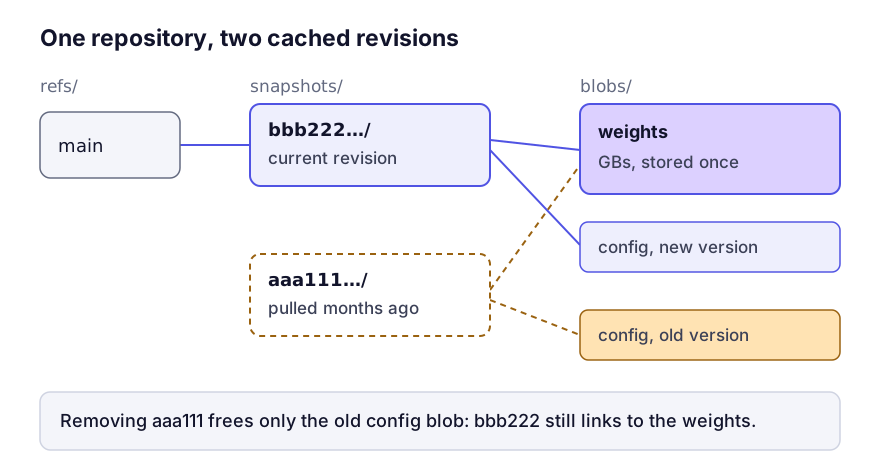
The symlinks are also why you shouldn’t delete blobs by hand. Remove one and the links pointing at it break, and you find out later from a file-not-found error deep inside a library. That’s specific to this cache: deleting files by hand from something like the pip cache is harmless.
Pruning it with the hf CLI
Current versions of huggingface_hub ship the hf command:
pip install -U huggingface_hub
hf cache ls
hf cache ls --revisions
hf cache prune
hf cache rm model/bert-base-cased --dry-run
hf cache ls lists each repository with its size on disk, when it was last accessed and modified, and which refs point at it. Add --revisions to see every cached snapshot, and filters such as --filter "accessed>30d" to narrow it down. Its totals count shared blobs once, so it’s a more honest inventory than adding up folders.
hf cache prune is the one to run first. It removes revisions no branch or tag points at any more, plus .incomplete files left by interrupted downloads. hf cache rm takes repository names or revision hashes and deletes those, along with any blob nothing else references. Both show what they’ll free and ask before deleting, and both take --dry-run.
In older versions the same jobs were done by huggingface-cli scan-cache and the interactive huggingface-cli delete-cache. If that’s what you have installed, they work the same way.
From Python, for a script or a scheduled job:
from huggingface_hub import scan_cache_dir
cache = scan_cache_dir()
old = [r.commit_hash for repo in cache.repos for r in repo.revisions
       if r.last_modified < some_cutoff]
cache.delete_revisions(*old).execute()
What to remove, in order
Interrupted downloads come first, because they are never useful. hf cache prune handles them, or check by hand:
find ~/.cache/huggingface -name '*.incomplete' | xargs -r du -ch | tail -1Superseded revisions next. If refs/main points at one commit and you have three others cached, those three are history you aren’t using.
Then datasets. ~/.cache/huggingface/datasets is a separate tree from the hub cache and on a machine doing any fine-tuning it’s often the bigger of the two:
du -sh ~/.cache/huggingface/datasets 2>/dev/nullLast, models you also hold in another format. On a machine doing local inference the commonest waste is the same weights as safetensors here and as a GGUF in LM Studio’s folder or Ollama’s blob store. Keeping both only makes sense if you use both runtimes.
Moving it
Set HF_HOME to the new location and move the existing directory there with something that keeps symlinks as symlinks:
export HF_HOME=/Volumes/External/huggingfaceA plain cp without -a follows every symlink and writes a full copy of each blob for every snapshot that links to it. Use rsync -a or cp -a.
The destination must support symlinks, which rules out exFAT. Without them huggingface_hub falls back to storing a full copy in each snapshot, and nothing is shared between revisions. That’s a real problem for an external drive you also use with Windows; moving model stores to an external drive covers choosing the file system.
Questions
Is it safe to delete the whole hub directory?
Yes, in the sense that everything downloads again. It’s the bluntest option there is, and it costs you every model at once.
Why does du report more than hf cache ls?
du on ~/.cache/huggingface also counts the datasets tree and anything else stored beside the hub cache, such as the xet directory newer versions use for download chunks. hf cache ls reports the hub cache only.
Do the symlinks work on Windows?
Only with Developer Mode turned on or Python running as administrator. Otherwise huggingface_hub copies files into each snapshot instead, and the cache is correspondingly larger because nothing is shared between revisions.
Keep reading
- Where Ollama stores models on Mac, Linux and WindowsOllama's model store is often the largest folder on a developer's machine, and it lives somewhere no cleaner looks. The exact paths on macOS, Linux, Windows and Docker, how to find the one your install really uses, how to delete models safely and how to move the store to another drive.
- LM Studio’s model folder, and what it keeps besides weightsLM Studio stores models in a Hugging Face-shaped tree that is easy to read once you know the convention. Where it is on each platform, what the extra files are, and how to share one model store with other tools.