 Bytesweep
 What’s inside an archive
Each .xcarchive is the output of one Archive build. It holds the app bundle exactly as you submitted it, a .dSYM for the app and for every framework it embeds, and the build metadata.
du -sh ~/Library/Developer/Xcode/Archives/*
ls ~/Library/Developer/Xcode/Archives/*/*.xcarchive/dSYMs
The dSYM is the part that matters. A release build strips the mapping from machine addresses back to file names and line numbers out of the binary and writes it to the dSYM instead. Without that file, a crash report from a user is a column of hexadecimal addresses.
Why a rebuild can’t replace it
This is where most cleanup advice goes wrong. Every build stamps its binary with a UUID, and its dSYM carries the same one. Symbolication only uses a dSYM whose UUID matches the binary in the crash report.
Rebuilding the same tag doesn’t get you that match. A different compiler or linker version, different optimisation decisions, even a different build order will shift addresses, and in practice the new build gets a new UUID. The dSYM has to come from the build that actually shipped.
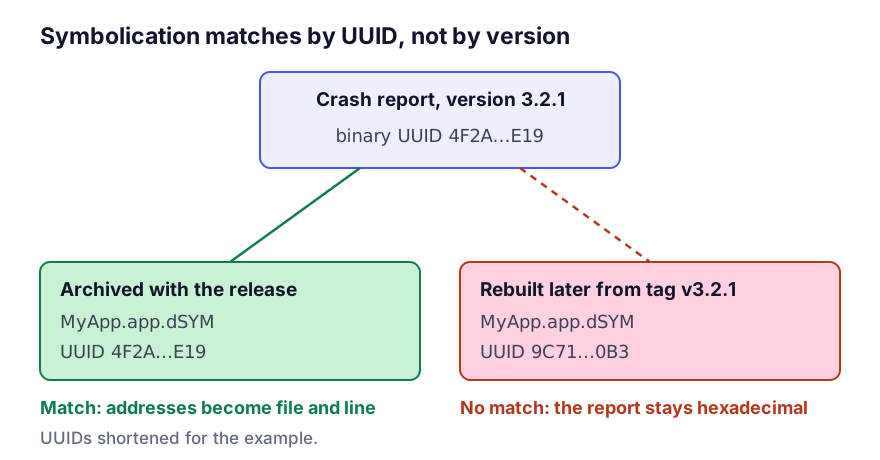
You can see this for yourself by comparing UUIDs:
dwarfdump --uuid MyApp.app/MyApp
dwarfdump --uuid MyApp.app.dSYM
So if the archive for 3.2.1 is gone and a user on 3.2.1 sends a crash report six months later, you can’t symbolicate it. Having the git tag doesn’t help.
This is the only directory under ~/Library/Developer/Xcode where deleting is permanent. Everything else costs a rebuild or a download.
How much to keep
Keeping everything for ever isn’t necessary either. A policy I’d defend:
- every version currently on the App Store or in TestFlight, without exception
- every version that still has a real install base (App Store Connect shows adoption by version, and anything above a per cent or two still sends crashes)
- the last release of each major version, for people who never update
- nothing else
That last line usually frees most of the space. Development archives from builds that never shipped tend to outnumber real releases by a wide margin.
# archives by date, newest first
ls -lt ~/Library/Developer/Xcode/Archives/*/ | head -40
Move old releases off the disk instead
An archive you no longer want on your working disk should be moved, not removed. dSYMs compress well, and a whole archive for a medium app is typically a few hundred megabytes:
cd ~/Library/Developer/Xcode/Archives
tar czf ~/Archives-backup/2026-releases.tgz 2026-*
Put the result on a backup drive, in the repository’s release storage, or wherever the team keeps release artefacts. If CI produces your shipping builds, the archive belongs in CI’s artefact store as policy. What CI and Fastlane leave on a developer Mac covers wiring that up so your laptop stops being the only copy.
Crash reporting services don’t cover everything
Crashlytics, Sentry, Bugsnag and similar services upload the dSYM at build time and symbolicate on their servers. If that upload is a dependable part of your release process, the local archive matters less, but only for crashes that reach that service. Crash reports in Xcode’s Organizer still symbolicate against your local archives, and so does the .ips file a user emails you.
Check that the upload actually ran for each release. A dSYM upload step that fails quietly is common, and people tend to find out on the day they need it.
If you came here for space
The neighbours are where the space is:
| Folder | Typical size | Cost of deleting |
|---|---|---|
DerivedData | 20–60 GB | A rebuild (details) |
iOS DeviceSupport | 5–40 GB | A few minutes on reconnect (details) |
CoreSimulator | 10–80 GB | Re-downloading runtimes (details) |
Archives | 2–30 GB | Permanent loss of symbolication |
Clear the first three completely before you touch the fourth.
Questions
Can I delete the .xcarchive and keep only the dSYMs?
Yes, and it’s a sensible compromise. The dSYMs are what symbolication needs; the app bundle is nice to have. Keep each archive’s dSYMs directory and discard the rest. Keep the third-party frameworks' dSYMs too, because a crash inside a vendored framework is unreadable without them.
Does App Store Connect keep my dSYMs?
For builds it recompiled from bitcode, yes, and you can download those. Bitcode was deprecated in Xcode 14, so for current builds that’s a historical case. Don’t treat App Store Connect as your copy.
How large is a dSYM?
For a medium iOS app, typically 50 to 500 MB, mostly from embedded frameworks. They compress to a fraction of that.
Keep reading
- DerivedData: what Xcode keeps there and when to delete itDerivedData is usually the largest folder in a developer's home directory. What Xcode stores in it, why it never shrinks, when deleting it fixes a build, and the one part of it worth keeping.
- iOS DeviceSupport is 30 GB of iPhones you no longer ownXcode keeps a full symbol cache for every iOS version of every device ever plugged in, and never removes any of them. What the folder is for, when you need it, and how to clear it without breaking debugging.
- Deleting iOS simulators safely, and what simctl really removesCoreSimulator keeps a runtime per iOS version and a device per configuration, and both accumulate. The commands that remove what is genuinely unused, and the caches simctl does not touch.