 Bytesweep
 So is docker volume prune safe? It depends on the flag, and on which volumes are unattached at the moment you run it.
What prune considers unused
docker volume ls
docker volume ls -f dangling=true
docker system df -v | sed -n '/VOLUME NAME/,$p'
The dangling=true filter lists volumes no container refers to, running or stopped. docker system df -v adds a size and a link count for each (read the Local Volumes section it prints; the build cache follows it). Zero links means the same thing: no container is using it right now.
That’s all prune looks at. On Docker Engine 23.0 and later, plain docker volume prune removes only the anonymous ones among them. docker volume prune -a removes the named ones too. On older engines the plain command already did.
Zero links doesn’t mean unimportant. Bring a Compose project down and every volume in it drops to zero, and it’s still your development database. A volume with one link, on the other hand, may belong to a container you abandoned months ago. The link count tells you almost nothing about value.
Read the labels
Where a volume came from is a better guide, and that’s recorded in its labels:
docker volume inspect <name> | head -30Compose sets com.docker.compose.project and com.docker.compose.volume, which tell you the project and the volume’s name inside it (myapp and pgdata, say). That’s usually enough to decide. This lists every volume with its project:
docker volume ls --format '{{.Name}}' | while read -r v; do
  proj=$(docker volume inspect "$v" --format '{{index .Labels "com.docker.compose.project"}}')
  echo "${proj:-<no project>}  $v"
done | sort
Anything printed as <no project> came from a bare docker run -v name:/path or from an image’s VOLUME instruction. That’s the set most likely to be truly orphaned.
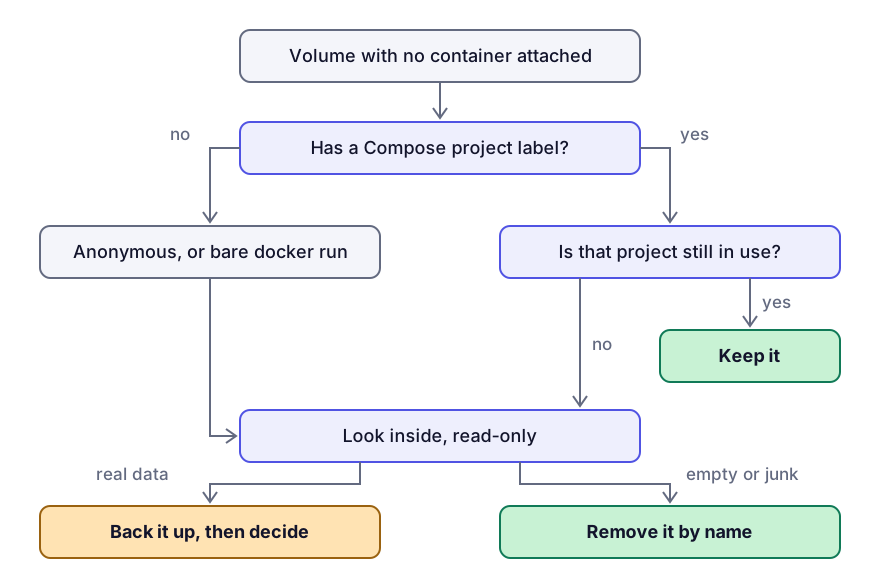
Look inside when the labels don’t settle it
Mount it read-only in a throwaway container. It takes a second and changes nothing:
docker run --rm -v <volume>:/v:ro alpine sh -c 'ls -la /v | head -30; du -sh /v'Most databases leave an obvious signature in the first few entries. PG_VERSION next to a base folder is PostgreSQL. ibdata1 is MySQL. A nodes directory is older Elasticsearch.
This is also the only way to read a volume on a Mac. docker volume inspect reports a Mountpoint, but that path is inside Docker’s Linux VM and doesn’t exist on your disk.
Back it up first
If you’re not sure, a tarball costs one line:
docker run --rm -v <volume>:/from -v "$PWD":/to alpine \
  tar czf /to/<volume>.tgz -C /from .
Restoring is the same shape in reverse:
docker volume create <volume>
docker run --rm -v <volume>:/to -v "$PWD":/from alpine \
  tar xzf /from/<volume>.tgz -C /to
Take the backup even when you’re fairly sure. A 200 MB tarball is cheap next to three months of local test data.
Delete by name, not by prune
Once you know which ones are orphans, remove exactly those, so nothing else gets caught:
docker volume rm vol1 vol2 vol3If you do want the bulk command, know that docker volume prune asks for confirmation but doesn’t list what it will remove. Run docker volume ls -f dangling=true first and read that list instead. What docker system prune deletes covers how the other prune commands treat volumes.
Two things prune never touches: bind mounts, which are directories on your own disk, and volumes attached to any container. docker compose down leaves volumes alone too. docker compose down -v removes them.
Where most of the hashes come from
An image with a VOLUME instruction gets a new anonymous volume every time a container starts from it without an explicit mount. Start a Postgres container fifty times without -v and you have fifty anonymous volumes, each named with a hash and each holding a full database. That accounts for most of the mystery gigabytes on a developer machine, and it’s the set plain docker volume prune is designed to clear.
docker volume ls -qf dangling=true | head -20Start throwaway containers with --rm and their anonymous volumes are removed along with them, so they never pile up.
If a volume looks bigger than the data in it, the usual reason is a database that has grown and never compacted. docker system df -v reports the volume’s file system usage, not the size of your tables.
None of this gives space back to macOS by itself, because the volumes live inside Docker’s disk image. That’s the other half of the problem.
Keep reading
- docker system prune: what each flag actually deletesThe difference between prune, prune -a and prune --volumes is the difference between freeing a few gigabytes and losing a local database. A precise account of what each form removes, with the safe order to run them in.
- Shrinking Docker.raw on a Mac without losing your imagesWhat to do when Docker.raw stays huge after a prune: why the Mac still counts blocks freed inside the VM, how a trim hands them back, when a full quit helps, and how to purge safely with a volume backup first.
- The BuildKit cache grows until something bounds itBuildKit keeps intermediate layers from every build, and whether anything caps them depends on your builder. How to see the cache's real size, prune it by age, and set a limit that holds.